We've had a few weeks to play around with the ODA in our office, and I've been able to crack it open and get to into the software and hardware that powers it.
For starters, the system runs a new model of Sun Fire - the X4370 M2. The 4U chassis is basically 2 separate 2U blades (Oracle is calling them system controllers - SCs) that have direct attached storage on the front. Here's a listing of the hardware in each SC:
| Sun X4370M2 System Controller Components (2 SCs per X4370M2) |
|
| CPU | 2x 6-core Intel Xeon X5675 3.06GHz |
| Memory | 96GB 1333MHz DDR3 |
| Network | 2x 10GbE (SFP+) PCIe card 4x 1GbE PCIe card 2x 1GbE onboard |
| Internal Storage | 2x 500GB SATA for operating system 1x 4GB USB internal |
| RAID Controller | 2x SAS-2 LSI HBA |
| Shared Storage | 20x 600GB 3.5" SAS 15,000 RPM hard drives 4x 73GB 3.5" SSDs |
| External Storage | 2x external MiniSAS ports |
| Operating System | Oracle Enterprise Linux 5.5 x86-64 |
Pictures of a real live ODA after the break.
If you're anything like me, the first thing you wanted to know about the ODA is what's inside? Follow along as we walk through the hardware involved.
What's an SC?
The SC is essentially Oracle's term for the blades that sit inside the Sun Fire X4370 M2.
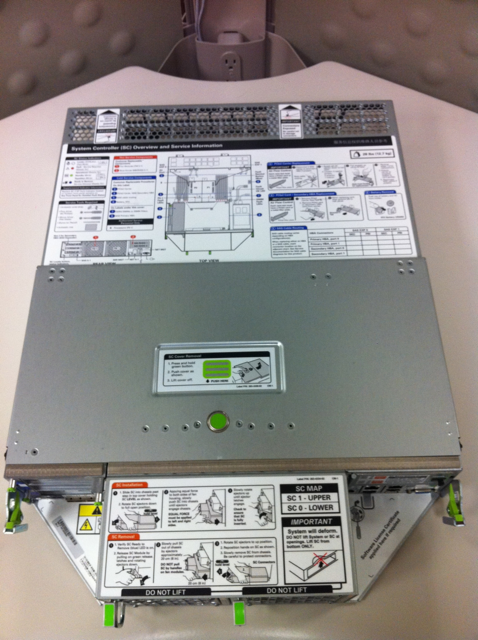
From this view, the back of the SC is at the bottom. At the top (front), are 2 connections that plug into the chassis of the X4370 M2. The SCs slide out from the back of the chassis. Looking closer at the back of the SC, we have the external connections
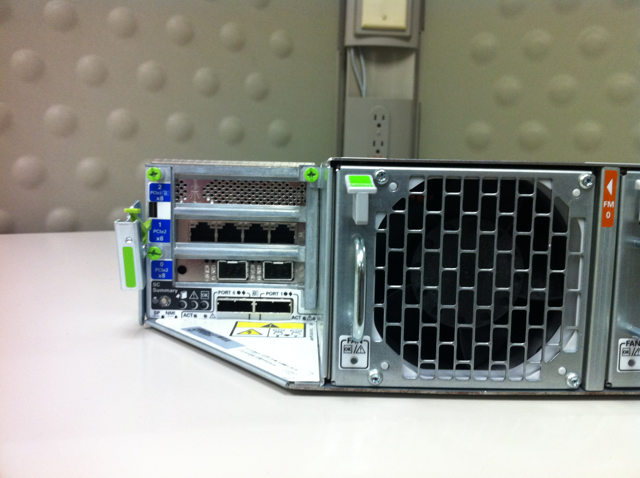
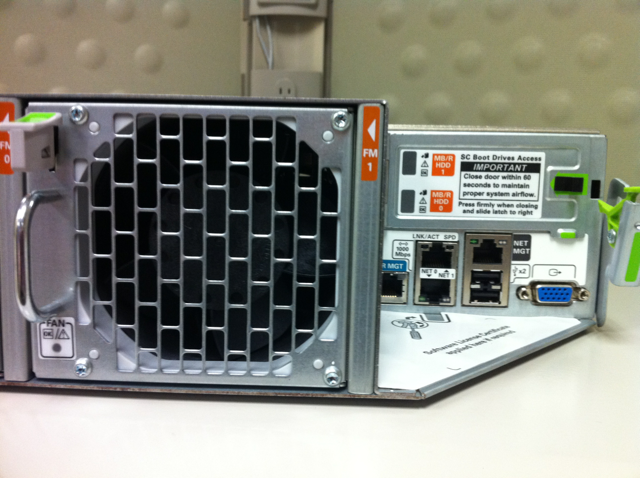
From the back, you can see the PCI cards on the left, and the onboard ports on the right. In the middle are the fan modules. On the left, we have 4, gigabit ethernet ports, 2, 10GbE (SFP+) ports, and the 2 external SAS connections. On the right are the dual gigabit ethernet (onboard) ports, the serial and network ports for the ILOM, and your standard VGA and USB ports. Above the onboard ports are the 500GB SATA hard drives used for the operating system.
What's Inside?
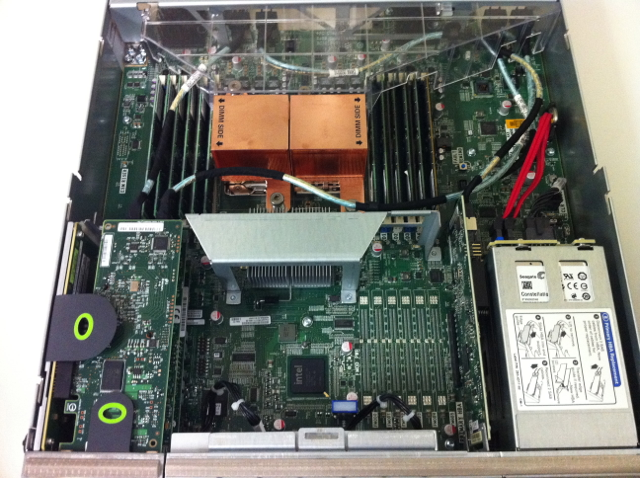
As mentioned above, there are 2 Seagate 500GB serial ATA hard drives that are used for the operating system:
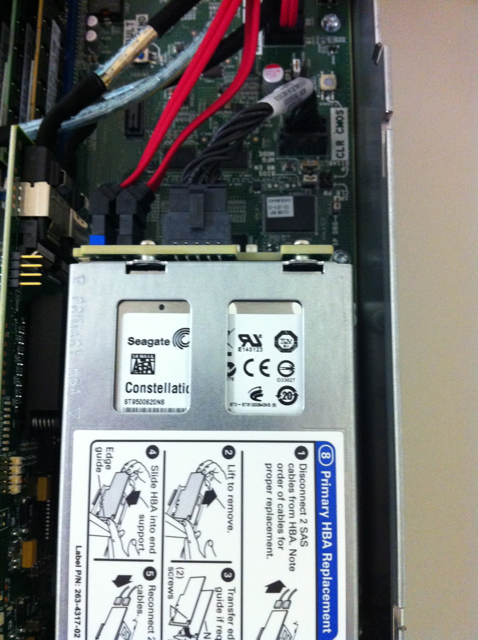
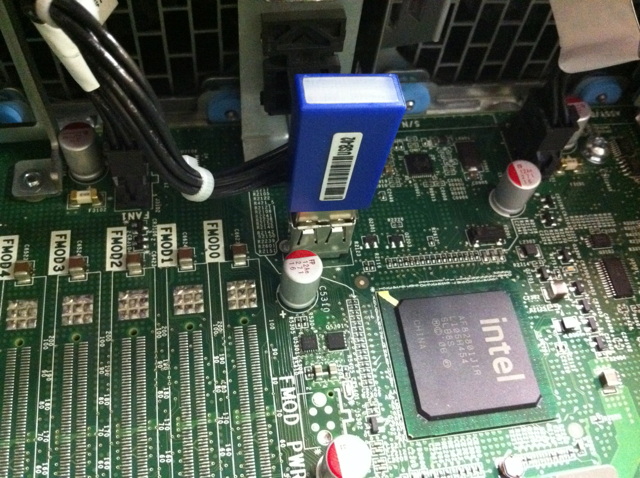
Along with the serial ATA drives is a 4GB USB flash stick that can be used to create a bootable rescue installation of Oracle Enterprise Linux. Also, this drive is used for some firmware updates.
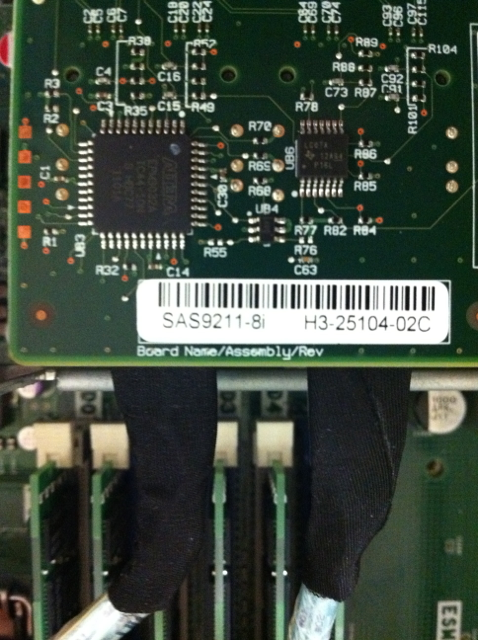
As for the disk controllers, each SC has 2 LSI controllers. One is on the internal PCIe slot, and another is on a standard PCIe slot. They are the SAS9211-8i controller.
Operating system
One of the many things that I found interesting on the box was that OEL 5.5 was installed, not one of the newer releases. Also, the server is running the RedHat compatible kernel, and not the Unbreakable Enterprise Kernel (UEK), which is the default on newer releases of OEL 5.
[root@xlnxrda01 ~]# uname -a
Linux xlnxrda01 2.6.18-194.32.1.0.1.el5 #1 SMP Tue Jan 4 16:26:54 EST 2011 x86_64 x86_64 x86_64 GNU/Linux
[root@xlnxrda01 ~]# cat /etc/redhat-release
Red Hat Enterprise Linux Server release 5.5 (Tikanga)
Disk configuration
As for the storage, Oracle has removed one of my biggest peeves with the Exadata storage servers. On Exadata, the operating system resides on 30GB partitions on the first 2 hard disks. Because of this, a 30GB griddisk has to be created on the remaining 10 disks, which becomes the DBFS_DG diskgroup (formerly SYSTEMDG). With Exadata, this diskgroup becomes the location for OCR/voting files, unless DATA or RECO is high redundancy. In that case, DBFS_DG is just wasted space. Anyways, going back to the ODA (that was the point of this post, wasn't it?), this problem is no longer present thanks to the 2 500GB 2.5" SATA drives in the back. These drives utilize software RAID (just like the Exadata storage servers), but don't take advantage of the active/inactive partition scheme:
[root@patty ~]# parted /dev/sda print

Model: ATA SEAGATE ST95001N (scsi)
Disk /dev/sda: 500GB
Sector size (logical/physical): 512B/512B
Partition Table: msdos

Number  Start   End    Size   Type     File system  Flags
 1      32.3kB  107MB  107MB  primary  ext3         boot, raid
 2      107MB   500GB  500GB  primary               raid

Information: Don't forget to update /etc/fstab, if necessary.

[root@patty ~]# parted /dev/sdb print

Model: ATA SEAGATE ST95001N (scsi)
Disk /dev/sdb: 500GB
Sector size (logical/physical): 512B/512B
Partition Table: msdos

Number  Start   End    Size   Type     File system  Flags
 1      32.3kB  107MB  107MB  primary  ext3         boot, raid
 2      107MB   500GB  500GB  primary               raid

Information: Don't forget to update /etc/fstab, if necessary.

[root@patty ~]# cat /proc/mdstat
Personalities : [raid1]
md0 : active raid1 sdb1[1] sda1[0]
      104320 blocks [2/2] [UU]

md1 : active raid1 sdb2[1] sda2[0]
      488279488 blocks [2/2] [UU]

unused devices:
[root@patty ~]# df -h
Filesystem            Size  Used Avail Use% Mounted on
/dev/mapper/VolGroupSys-LogVolRoot
                       30G  7.4G   21G  27% /
/dev/md0               99M   17M   77M  18% /boot
/dev/mapper/VolGroupSys-LogVolOpt
                       59G  5.8G   50G  11% /opt
/dev/mapper/VolGroupSys-LogVolU01
                       97G  188M   92G   1% /u01
tmpfs                  48G     0   48G   0% /dev/shm
Let's look at the LVM setup a little closer. We have a physical volume with a 465GB volume group (VolGroupSys). From here, we have LogVolRoot (30GB), LogVolOpt (60GB), and LogVolU01 (100GB). That leaves us with more than 250GB free on each SC for either adding new filesystems, growing existing filesystems, or taking LVM snapshots.
[root@patty ~]# pvdisplay
  --- Physical volume ---
  PV Name               /dev/md1
  VG Name               VolGroupSys
  PV Size               465.66 GB / not usable 3.44 MB
  Allocatable           yes
  PE Size (KByte)       32768
  Total PE              14901
  Free PE               8053
  Allocated PE          6848
  PV UUID               Q99xBf-AMdf-so7d-VF8J-cIjB-cHeQ-cbWzSD

[root@patty ~]# vgdisplay
  --- Volume group ---
  VG Name               VolGroupSys
  System ID
  Format                lvm2
  Metadata Areas        1
  Metadata Sequence No  5
  VG Access             read/write
  VG Status             resizable
  MAX LV                0
  Cur LV                4
  Open LV               4
  Max PV                0
  Cur PV                1
  Act PV                1
  VG Size               465.66 GB
  PE Size               32.00 MB
  Total PE              14901
  Alloc PE / Size       6848 / 214.00 GB
  Free  PE / Size       8053 / 251.66 GB
  VG UUID               96cHoA-qhpG-A2hr-tbG1-c1oW-k9lI-MGURFU

[root@patty ~]# lvdisplay
  --- Logical volume ---
  LV Name                /dev/VolGroupSys/LogVolRoot
  VG Name                VolGroupSys
  LV UUID                5qpcEM-aPPA-hGGf-GBBs-nwRi-HUNN-qrsIQp
  LV Write Access        read/write
  LV Status              available
  # open                 1
  LV Size                30.00 GB
  Current LE             960
  Segments               1
  Allocation             inherit
  Read ahead sectors     auto
  - currently set to     256
  Block device           253:0

  --- Logical volume ---
  LV Name                /dev/VolGroupSys/LogVolOpt
  VG Name                VolGroupSys
  LV UUID                Ge110F-s9oB-Eqak-muo0-3yWn-GEuN-klI1Rs
  LV Write Access        read/write
  LV Status              available
  # open                 1
  LV Size                60.00 GB
  Current LE             1920
  Segments               1
  Allocation             inherit
  Read ahead sectors     auto
  - currently set to     256
  Block device           253:1

  --- Logical volume ---
  LV Name                /dev/VolGroupSys/LogVolU01
  VG Name                VolGroupSys
  LV UUID                lDBl2R-ZpX7-QZxJ-t8wI-DKde-kANX-zPf3XP
  LV Write Access        read/write
  LV Status              available
  # open                 1
  LV Size                100.00 GB
  Current LE             3200
  Segments               1
  Allocation             inherit
  Read ahead sectors     auto
  - currently set to     256
  Block device           253:2

  --- Logical volume ---
  LV Name                /dev/VolGroupSys/LogVolSwap
  VG Name                VolGroupSys
  LV UUID                Z2shPb-Dbe6-oVIR-hq2z-nDHs-xfNW-43miCW
  LV Write Access        read/write
  LV Status              available
  # open                 1
  LV Size                24.00 GB
  Current LE             768
  Segments               1
  Allocation             inherit
  Read ahead sectors     auto
  - currently set to     256
  Block device           253:3
Network Configuration
The ODA has 8 (6 GbE and 2 10GbE) physical ethernet ports available to you, along with 2 internal fibre ports that are used for a built-in cluster interconnect. Here's the output of running "ethtool" on the internal NICs:
[root@patty ~]# ethtool eth0
Settings for eth0:
        Supported ports: [ FIBRE ]
        Supported link modes:   1000baseT/Full
        Supports auto-negotiation: Yes
        Advertised link modes:  1000baseT/Full
        Advertised auto-negotiation: Yes
        Speed: 1000Mb/s
        Duplex: Full
        Port: FIBRE
        PHYAD: 0
        Transceiver: external
        Auto-negotiation: on
        Supports Wake-on: d
        Wake-on: d
        Current message level: 0x00000001 (1)
        Link detected: yes
[root@patty ~]# ethtool eth1
Settings for eth1:
        Supported ports: [ FIBRE ]
        Supported link modes:   1000baseT/Full
        Supports auto-negotiation: Yes
        Advertised link modes:  1000baseT/Full
        Advertised auto-negotiation: Yes
        Speed: 1000Mb/s
        Duplex: Full
        Port: FIBRE
        PHYAD: 0
        Transceiver: external
        Auto-negotiation: on
        Supports Wake-on: d
        Wake-on: d
        Current message level: 0x00000001 (1)
        Link detected: yes
Surprisingly, these NICs aren't bonded, so we have 2 separate cluster interconnects, which means that we also have 2 HAIP devices. Also, eth1 and eth2 (the onboard NICs) were used to create a bond for the public traffic.
[patty:oracle:+ASM1] /home/oracle
> oifcfg getif
eth0  192.168.16.0  global  cluster_interconnect
eth1  192.168.17.0  global  cluster_interconnect
bond0  192.168.8.0  global  public
Note that the default configuration of the ODA doesn't include a management network, like the Exadata does. That doesn't mean that you can't set up a management network, just that it's not part of the initial setup process.
There's a little overview of what's inside the ODA. The next piece in the series will go into a little more detail on the disks, as well as the Oracle configuration.
X4370M2? That’s just silly when there was no M1.
Don’t put it past Oracle….they started the database product with version 2.
And OAK just jumped from 2.10 to 12.1 ^^
I suppose that, while sporting the same lack of correctness, Oracle’s methods appear to outperform Microsoft’s way of counting (2, 3, 386, 3.1, 3.11, 95, 98, 2000, 7, 8, 10)
Pingback: Kerry Osborne’s Oracle Blog » Blog Archive » Oracle Database Appliance – (Baby Exadata) – Kerry Osborne’s Oracle Blog
Pingback: Oracle Database Appliance (ODA) Installation / Configuration « Karl Arao's Blog
The would have been a Sun product in development called X4370. Since Oracle’s acquisition of Sun the product has been further developed and thus tagged M2.
the Nehalem product without M2
all westmere server has M2 tag
Nic post questions
1)can you share the cluster interconnect cables and Internal card that has two ge and
2)there is 4 more slots open, can one add more SSD?
3)why the name oakcli?
4)what is the function of two UART port?
5)any picture of two SAS HBA connect to both server?
thx
@laotsao – The 2 UART ports are used for the internal cluster interconnect. Because the UDA is designed to only be used as a 2-node RAC, they eliminated the need for a cluster interconnect that is cabled. As for adding more SSD, there’s no room…It’s got 24 disk slots, and has 20 hard disks, 4 SSD. oakcli comes from “Oracle Appliance Kit CLI.”
When I’m back in the office, I’ll try to get some more pics of the inside. We’ll see if I can get the guys to let me take one of the nodes down.
Pingback: Oracle Database Appliance – (Baby Exadata) « Ukrainian Oracle User Group
thx, yes there is no more slots open with 4 SSD and 20 SAS HDD
Great post, Andy!
Only one thing: The DBFS_DG is not wasted space if you implement the DBFS database (therefore the new name of the diskgroup) with it’s tablespaces there. That is the recommended way to host flat files (that you may use for SQL*Loader or External Tables) on Exadata.
Pingback: Oracle Database Appliance, ¿database appliance o database-in-a-box? « avanttic blog
Pingback: Blog: Inside the Oracle Database Appliance –... | Oracle | Syngu
Pingback: DBappliance images | LaoTsao's Weblog (老曹的網路記)
Pingback: Your Questions About Serial Ata Drives
Andy are there any gotchas with the shared storage ?
Can you address it from each controller on each SC ? Assuming you want a volume on each SC.
Do you have to take the triple protection on the controller or could you take a two raid 6 volumes at 4800GB each ?
Cheers Vin
Vin,
The shared storage is configured to be used within ASM diskgroups. By default, there are 3 diskgroups created: DATA, RECO, and REDO. If you want a shared filesystem between the 2 SCs, you will use either external NFS storage, or create a volume using ACFS. It is my understanding that the only protection for the ASM disks is through ASM redundancy, which we have seen to be very resilient. High redundancy is how the box was set up by the configurator, and there was not an option through the GUI to change that. If you are running this in a production environment, I would definitely recommend running with high redundancy. There is no hardware RAID used on the ASM disks. The 500GB disks that are in the back are isolated to each SC.
One thing that I mentioned above were the 2 external SAS ports. I’ve heard from a couple of people at Oracle that the ODA does not support using these external connections. It sounds like (no official confirmation) that the only supported methods of storage expansion are using NFS (preferably direct NFS) and iSCSI. We’re working on iSCSI in our lab, and it’s not as straightforward as you would expect. Results on that in a future post.
Pingback: Inside the Oracle Database Appliance – Part 2 « Oracle-Ninja.com
Hi there ,
Can you please tell me what are ip address requirement for EE single node installation?
Is that 2 ip per ODA is enough for EE single node installation?
Thanks
Ahmed
Pingback: Small Business Solutions » Database Tuning for Oracle VMware
Ahmed,
No matter what your configuration is, you will need 8 IP addresses. That includes 2 for the ILOMs (each SC has an ILOM), 2 for the SCs, 2 for VIPs (each SC will have a vip), and 2 for the scan (because the cluster will only have 2 nodes, it only needs 2 IPs for the scan). While it isn’t required to have the ILOMs connected to the network, it is definitely recommended. Also, even if you chose to not run RAC for the ODA, you will still get a clustered grid infrastructure, which will utilize the VIPs and scan. This is included free of charge when you license enterprise edition.
Hi,
There is a requirement that the interconnect will use switched network and not cross cable.
How is it implemented in ODA ? Do they have internal switch on the somehow changed the concept and are using cross cable
Hadar
They’re not really switched interfaces, but the internal NICs use the onboard Intel 82576 chip. From the RAC FAQ (note #220970.1):
——————————————————————————————
Is crossover cable supported as an interconnect with RAC on any platform ?
NO. CROSS OVER CABLES ARE NOT SUPPORTED. The requirement is to use a switch:
Detailed Reasons:
1) cross-cabling limits the expansion of RAC to two nodes
2) cross-cabling is unstable:
a) Some NIC cards do not work properly with it. They are not able to negotiate the DTE/DCE clocking, and will thus not function. These NICS were made cheaper by assuming that the switch was going to have the clock. Unfortunately there is no way to know which NICs do not have that clock.
b) Media sense behaviour on various OS’s (most notably Windows) will bring a NIC down when a cable is disconnected. Either of these issues can lead to cluster instability and lead to ORA-29740 errors (node evictions).
Due to the benefits and stability provided by a switch, and their afforability ($200 for a simple 16 port GigE switch), and the expense and time related to dealing with issues when one does not exist, this is the only supported configuration.
From a purely technology point of view Oracle does not care if the customer uses cross over cable or router or switches to deliver a message. However, we know from experience that a lot of adapters misbehave when used in a crossover configuration and cause a lot of problems for RAC. Hence we have stated on certify that we do not support crossover cables to avoid false bugs and finger pointing amongst the various parties: Oracle, Hardware vendors, Os vendors etc…
——————————————————————————————
It’s my understanding that Oracle has tested against these chips and has verified that the issues above are not present on this particular chip.
Um, well. Depending on your configuration you could run with anything from two IP adresses up to dozens or hundreds. The default configuration aims at 6 IP addresses for a DNS based configuration, or 5 addresses if you choose to go without DNS round robin. The ILOM requires 2 ip addresses (and 2 switch ports) if connected to the network, but thankfully this is optional.
One solution-in-a-box design I’ve been working on uses only 3 IP addresses, one for each physical node and one for a virtual router that acts as a gateway for the (mostly) virtual network infrastructure.
As for switch-less network configurations, as far as I know it was never a matter of Oracle not supporting RAC clusters with interconnect on crossover cables, just that they would not certify such an implementation. The difference is significant.
With the ODA, Oracle have changed their views on a number of things, including redo multiplexing, crossover cables and a couple of physical laws. ODA does use crossover copper cables (although, these days such cables are not actually crossed) or twinax cables with integrated SFP+ interfaces if you prefer to use the copper ports for the public interfaces.
At least they are still consistently inconsistent…
Dear Folks,
I have requirement to install Active/Passive on ODA,
Kindly send me the step by step to install Active/Passive configuration.
Are you talking about RAC one node? When running the deployment, simply choose the advanced option, and you can choose between RAC, RAC one node (active/passive), and Enterprise Edition (only single-instance databases).
I am looking at the back of our Sun Fire box and i see an unused Ethernet port;
(left side of box)
[X][X][X][0]
^What port is this?
I have eth0 -> eth9
This is the default config:
eth0 192.168.x.x
eth1 192.168.x.x
bond0 – two 1G network interfaces (eth2/eth3) bonded together
bond1 – Two 1G network interfaces (eth4/eth5) bonded together
bond2 – Two 1G network interfaces (eth6/eth7) bonded together
xbond0 – Two 10G network interfaces (eth8/eth9) bonded together
Sorry for the delay. That port is The port that you’re looking at is eth7.
Hai, I’ve already installed ODA 2.3 but my client need the database at least 6TB space. How to determine double mirror and triple mirror
Unfortunately, there is no way to change from high redundancy to normal. It requires a new deployment using version 2.4 of the Oracle Appliance Kit.
Do you know if upgrading to OAK 12.1.x will let you change the redundancy configuration as it migrates to full ACFS?
is it possoble to run Oracle VM environment on ODA x4370
Yes, nasmel. Oracle Database Appliance Virtualized Platform is supported on the original ODA. Although, depending on the use case, the low amount of memory (when compared to ODA X3-2, X4-2 and the X5-2) may be a limiting factor.